
Applied Ballistics Quantum
Applied BallisticsSports
4.6411.00 Reviews
- Version
- 3.7.11
- Installs
- 100.00K
- Age Rating
- Everyone
Screenshots
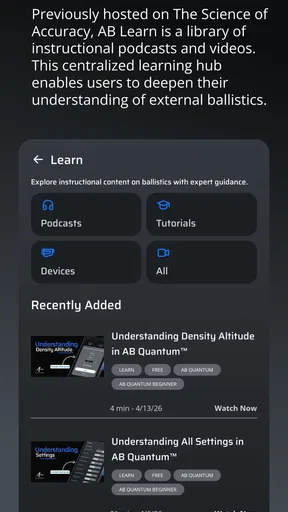
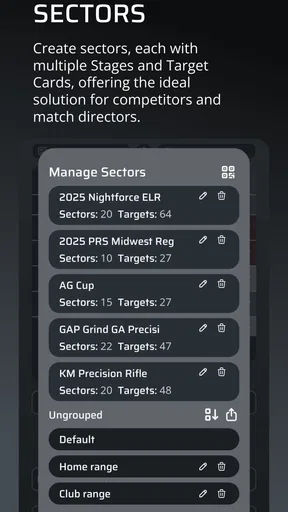
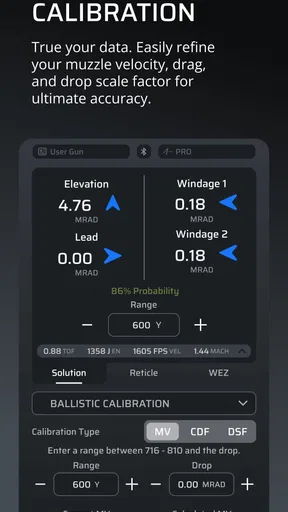
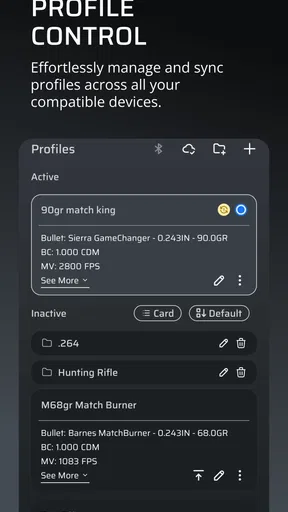
Our Review of Applied Ballistics Quantum
 Analysis by Appyee
I think Applied Ballistics Quantum makes the most sense when you want to understand how a shot’s predicted path changes with your inputs, not when you’re looking for a quick, simplified shooting aid. Its value is in bringing bullet information, trajectory calculations, and environmental variables together. That depth is useful, but it also asks you to enter meaningful information and understand what the result represents. I’d recommend it to people who enjoy the technical side of shooting; casual users may find a basic calculator easier to approach.
A tool for working through the variables
Applied Ballistics, the developer, focuses this free Sports app on ballistic calculations rather than broad outdoor features. It has a 4.4 average from around 1,700 ratings, and more than 50,000 installs. Those figures suggest an established audience, but they don’t tell you whether it suits your particular workflow. The practical question is whether you want to explore the relationship between a projectile, distance, and changing conditions, or just need a simple reference while out shooting.
One useful way to approach a ballistic calculator is as a planning aid, not a promise that every field result will match its prediction. The calculation depends on the information you provide, so a sensible routine is to check your inputs before treating an output as actionable. That habit matters especially when you’re moving between different ammunition or conditions. I’d use the app to prepare, compare scenarios, and learn; I wouldn’t let a screen replace careful judgment or safe range practice.
The app is free to install and rated for Everyone, while optional in-app purchases range from around two dollars to around three hundred dollars per item. That broad span makes it worth checking what a particular purchase offers and whether you actually need it before spending. If you only want to explore the basic experience, start with what is available without paying. The current version is 3.6.0, and it requires Android 8.0 or later on Android devices.
Getting Started with Applied Ballistics Quantum
First things first, installing the app was a breeze. It’s available for both Android and iOS, so no matter your device preference, you’re covered. Once you’ve got it up and running, the interface is surprisingly straightforward. I know that apps dealing with technical topics can sometimes be overwhelming, but this one does a good job of keeping things user-friendly.
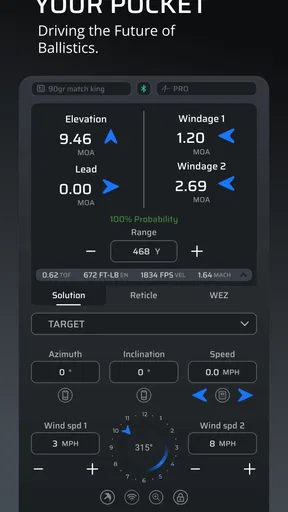
When you open the app, you're greeted with a clean dashboard. From here, you can access various features, like bullet library, trajectory simulations, and even weather conditions. The app's design seems to prioritize functionality over flashiness, and I appreciate that. You’re here to get accurate data, not be dazzled by graphics.
Exploring the Features
The Applied Ballistics Quantum app is packed with features that cater to all levels of shooters. One of the standout features for me was the bullet library. It’s extensive, to say the least. You can select from a wide range of bullet types and calibers, which is super helpful if you’re experimenting with different ammo or just want to compare data.
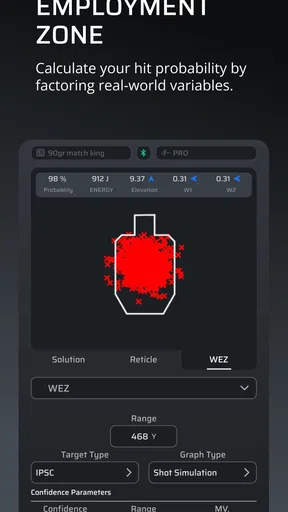
Another feature that caught my attention is the trajectory simulation. This is where the app truly shines. You can input various parameters like distance, angle, and environmental conditions, and the app calculates the bullet’s path. It's like having a ballistics expert in your pocket! The accuracy of the simulations is impressive, and it’s a fantastic tool for planning your shooting sessions.
Speaking of environmental conditions, the app also allows you to input weather data. This includes wind speed, direction, temperature, and even barometric pressure. For those who are serious about long-distance shooting, this level of detail is crucial. The app’s ability to factor these into its calculations is a game-changer.
Planning a session, not just checking a number
A practical workflow begins before you reach the firing line. I’d first choose the bullet information that matches the ammunition I intend to use, then set up a distance and a set of conditions for the calculation. If I’m comparing two possible loads, I’d change one variable at a time rather than altering several inputs together. That makes the result easier to interpret: I can see whether the change I made explains the difference, instead of guessing which adjustment mattered.
For a realistic day at the range, imagine arriving to find the weather has shifted since you planned the session. Rather than relying on yesterday’s assumptions, you can enter the conditions you’re working with and recalculate. I’d still treat that output as a starting point and make careful observations during practice. The important benefit is being able to think through how wind, temperature, and pressure enter the calculation, not simply to accept a suggested correction without context.
There’s also a useful learning angle here. A new shooter can hold the distance steady and explore how changing one environmental input affects the predicted path; an experienced user can use the same controlled comparison to check a plan before shooting. This is more informative than tapping through several settings at once. It also helps expose a limitation: if you don’t know which values belong in a field, the app can’t turn uncertain inputs into dependable real-world guidance.
Where it fits among shooting apps
Compared with a pocket note, printed reference, or a basic calculator, this app brings more of the calculation process into one place: projectile selection, trajectory simulation, and weather inputs are part of the same workflow. That can save the mental effort of switching between separate references. The trade-off is complexity. A simple tool may be faster when you only need a rough lookup or want to keep phone interaction to a minimum, while Quantum is better suited to someone who intends to examine variables and prepare deliberately.
I’d also keep a separate record of the setup and conditions used for a session rather than assuming that a calculation alone tells the whole story. Writing down what you entered and what you observed gives you something useful to compare next time. It’s a low-tech companion to the app, not a replacement for it, and it helps you notice when a mismatch may come from an input or a changed condition rather than from the calculation itself.
Performance and Usability
In terms of performance, the app runs smoothly. I tested it on both an Android device and an iPhone, and I didn’t encounter any glitches or crashes. The developers have clearly put effort into ensuring a stable experience, which is always a plus.
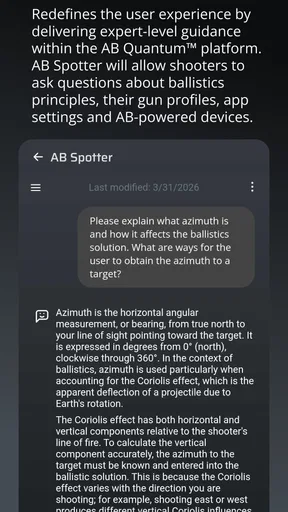
As for usability, I found the app to be intuitive. Even if you're not a tech-savvy person, navigating through the menus and inputting data is straightforward. The app provides helpful tooltips and explanations for various functions, which can be a lifesaver if you're unsure about something.
That said, “straightforward” doesn’t mean there is nothing to learn. Ballistic outputs are only as useful as the details behind them, and newcomers may need time to understand what they should enter and how to interpret the result. I’d explore the controls somewhere comfortable before relying on them during a busy session. Entering values calmly at home is less distracting than trying to learn a technical interface while also managing equipment and paying attention to the range.
Phone use is another small but real consideration. A calculator can be convenient, yet handling a device in the middle of a session may interrupt concentration. I’d prepare the calculation in advance where possible, then consult it at an appropriate moment rather than repeatedly checking the screen. For anyone who prefers a paper card or a very minimal tool at the firing line, that extra interaction may outweigh the app’s added detail.
Who will get the most from it
I see the strongest fit for shooters who already care about how ammunition and conditions affect a trajectory, and for learners willing to build that understanding gradually. It can also help someone comparing scenarios before a planned outing, because changing an input gives a concrete way to examine the consequences. If your main goal is simply to record a casual range visit or find a general shooting community, a different kind of sports app would be a better match; Quantum is focused on calculations rather than social activity or broad training plans.
Beginners need not avoid it, but I’d recommend approaching it as a learning instrument rather than an automatic coach. Start with a familiar setup, make one adjustment at a time, and ask whether the output makes sense before acting on it. Someone who wants immediate, uncomplicated answers without learning the terminology may be happier with a simpler alternative. And if you’re selecting an optional purchase, decide based on a specific need instead of assuming that a higher-priced item is necessary for everyone.
Real-World Application
Now, let’s talk about how this app performs in real-world scenarios. I took it out to a local shooting range to put it to the test. I was particularly interested in seeing how the trajectory simulations matched up with actual shots. To my delight, the app's predictions were spot on. It was like having a personal coach guiding each shot.
The weather integration also proved invaluable. On a particularly windy day, the app’s calculations allowed me to adjust my aim accurately. This level of precision is crucial, especially when you’re dealing with long-range targets.
For me, the most important practical safeguard is to treat a predicted result as something to validate, not a guarantee. Conditions can change, and a mistaken entry can make a polished calculation misleading. I’d compare what the app suggests with what I observe during safe, controlled practice and avoid making hurried adjustments. That careful approach doesn’t take away from the tool; it is what makes a technical tool more useful.
Final Thoughts
Overall, the Applied Ballistics Quantum app is a fantastic tool for anyone interested in improving their shooting skills. It's comprehensive enough for experienced shooters while remaining accessible to beginners. The attention to detail, from the bullet library to weather data integration, makes it stand out in the world of ballistic apps.
If you’re serious about shooting or just want to enhance your accuracy, I highly recommend giving this app a try. It's not just about hitting the target; it's about understanding the science behind each shot. And with this app, you’re well-equipped to do just that. So, gear up and let the precision games begin!
My recommendation comes with a clear qualification: choose it if you want a hands-on ballistic calculator and are prepared to learn how its inputs shape its answers. Skip it if you want a one-tap solution, a general-purpose sports companion, or a substitute for safe practice and sound judgment. For the right person, the mix of projectile choices, trajectory work, and weather variables makes it a thoughtful planning aid; for everyone else, the detail may feel like more work than the task requires.
Verdict
Strengths of Applied Ballistics Quantum
- Accurate trajectory predictions for shooters.
- Wide range of supported bullet types.
- User-friendly interface with clear instructions.
- Regular updates with new features.
- Advanced environmental condition settings.
Limitations of Applied Ballistics Quantum
- Requires a subscription for full features.
- Can be overwhelming for beginners.
- Limited offline functionality.
- High battery consumption with prolonged use.
- Not available on older device models.
Similar Picks in This Category
View All
BeSoccer: Soccer Live Score
BeSoccer apps4.3

Cricbuzz - Live Cricket Scores
Cricbuzz.com3.7

NFL
NFL Enterprises LLC2.4

Da Fit
MO YOUNG LIMITED3.6

ESPN
Disney4.5

LiveScore: Live Sports Scores
LiveScore Limited4.5
Frequently Asked Questions
What is the purpose of the Applied Ballistics Quantum app?
Applied Ballistics Quantum is designed for precision shooters and ballistic enthusiasts. It provides accurate ballistic calculations, environmental condition analysis, and trajectory predictions. The app is ideal for both beginners and experts looking to enhance their shooting performance with scientifically-backed data and predictions.
Is the Applied Ballistics Quantum app user-friendly for beginners?
Yes, the app is designed with an intuitive interface, making it accessible for beginners while offering advanced features for seasoned users. It includes detailed tutorials and guides to help new users understand ballistic concepts and optimize their shooting experience.
Does the app require internet connectivity to function?
The app can perform basic calculations offline. However, certain features, such as weather condition updates and cloud data synchronization, require an internet connection. For optimal performance and access to all features, periodic internet access is recommended.
Are there any devices that the app is not compatible with?
Applied Ballistics Quantum is compatible with most modern Android and iOS devices. However, it requires a minimum operating system version (check the app store for specifics). Older devices or those running outdated OS versions might experience reduced functionality or compatibility issues.
Does the app offer regular updates and support?
Yes, the app developers frequently release updates to improve functionality, add new features, and ensure compatibility with the latest devices. Users can also access customer support for troubleshooting and inquiries, ensuring a smooth and effective user experience.
